
While you and your team are working away in LOU, LOU is building general ledger postings in the background that tell a story of all the transactions you’re creating. Using our General Ledger accounts, we’ve summarized the way certain transaction types post to your LOU General Ledger below. If you’ve customized your LOU General Ledger, the account names may be different, but the type of account (Asset, Expense, Liability, Revenue) should be the same.
IMPORTANT! Not all transactions impact your LOU General Ledger. Here is a list of transactions with no GL impact:
- All Beginning Balance Activity during Onboarding
- Creating a new Estimate
- Creating a new Sales or Work Order
- Creating Recurring Orders
- Creating a new Purchase Order
- Placing a Purchase Order On Order
- Creating a Stock Transfer
- Creating, Fulfilling, and Receiving an ICPO
What about LOU Retail POS? I’m glad you asked! Transactions posted through the LOU Retail POS app post to the same GL accounts as described in transaction scenarios below.
Quick Access Links
5. Invoicing Negative Quantities
8. LOU Accounting - Accounts Payable (Expenses)
Taking a Deposit on a Pending Order
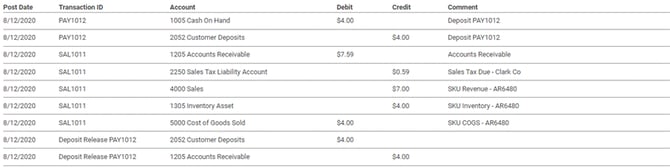
A cash deposit of $4.00 was taken on an Order. Deposit Amounts remain on the Customer Deposit liability account until the Order is invoiced and the Deposit is applied to an Invoice.

Invoicing an Order with a Deposit on File
Revenue is recognized when you invoice an Order. Invoicing an Order is also when LOU will adjust your inventory quantities to reflect the sale is complete. In the GL below we can see a few things happening:
- The $4.00 deposit on the order was removed from the Customer Deposit Liability account and posted to Accounts Receivable.
- The tax amount, $0.59, posted to the Sales Tax Liability Account
- Total sales revenue of $7.00 posted to our GL 4000 Sales
- Since inventory was reduced we recognized the decrease in inventory assets and recognized the cost of the inventory, $4.00 to Cost of Goods Sold.
Taking a Payment on an Invoice
This payment was taken as a card payment. Credit Card Payments impact the Merchant Clearing General Ledger account rather than the Cash on Hand General Ledger account. You will clear your Merchant Clearing account in your accounting software outside of LOU or in LOU Accounting when you do your Bank Reconciliation.

An Unapplied Payment is a Payment that was not associated with an open Order (as a Deposit) or Invoice. Unapplied Payments impact the General Ledger the same way as a Payment applied to an Invoice or Order.

Receiving Inventory on a Purchase Order
When you receive inventory on a PO, the cost of the items received will be posted to a liability account called Purchases Accrued Not Due (PAND). This liability account will retain the cost of your inventory received until you associate the received inventory to an AP invoice. In LOU Accounting, this is done by posting a Bill Expense Type to which you apply Inventory (Purchase Receipts) and paying the Bill. Outside of LOU, this is done however you process Vendor Invoices.

Creating a Stock Adjustment
For this stock adjustment, we increased an item quantity on hand. The new inventory quantity increased the Inventory Asset account.

Invoicing Negative Quantities
When you do not have sufficient quantity on hand to fulfill an Order and you go to invoice, LOU will give you a warning that doing so will result in a negative quantity. You should stop and correct inventory levels before proceeding. However, if you choose to proceed anyway, LOU will Invoice the Order and the SKU quantity will become negative.
This will cause $0 to post to Inventory Asset, COGS, and Miscellaneous Revenue. Accounts Receivable will be debited while the Sales Tax Account(s) and Revenue Account will be credited.
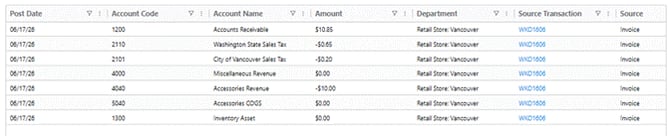
Once you correct the negative quantities, LOU will credit the correct amount to the Inventory Asset and debit the correct amount to COGS and Miscellaneous Revenue accounts to offset these postings.
This refund was done with cash which is why the Cash on Hand GL account was impacted.

A Refund is a separate transaction from a Payment transaction. For that reason, the Refund transaction will post on the date it is created which may differ from the date of the original Sale transaction.
Voiding a Payment
Voiding an invoice will reverse all the original General Ledger activity created when invoicing the Order. You can see the [Reversal] on the right-hand side of the screenshot. It’s important to note that voiding an invoice will reopen the Sales or Work Order for additional action to be taken.
IMPORTANT! Voids are intended for transactions that were a mistake or need to be reversed, not for transactions that need to be refunded.

The reversal will post to the same date as the original Invoice even if you are voiding an Invoice from another day. If you have already exported this date from LOU and imported it into QuickBooks Online, you will not be able to re-import updated data into QBO. You will have to manually change the information in QuickBooks Online. In LOU, you can delete and recreate the batch, but it cannot be re-imported into QuickBooks Online, per QuickBooks Online’s limitations.
GL Postings are a record of transactions at the time they occur. For that reason, the Voids/reversals do not remove original GL Postings. Instead, they are posted as separate GL Postings.
REMEMBER! You can only Void an Invoice during the same Accounting Period. To process a refund on an Invoice in a previous Accounting Period, you will need to create a Return Order and process the refund through a Return Invoice. For LOU Retail POS, you would simply post a Return Transaction through the LOU Retail POS app on your PAX machine.
LOU Accounting AP Expense Bill Payment
LOU Accounting Expenses are your Accounts Payable. There you will create Expenses and Bills, and pay those Bills.
REMEMBER! An Expense Type represents a liability that has already been paid by Cash, Credit Card, or another payment besides Check. The Check Type represents a liability already paid by Check (not a Check printed in LOU). The Bill Type represents a liability that must be paid through the Pay Bills process.
Since Expenses and Bills are slightly different, they will post to the GL slightly differently. An Expense will include the Payment Account (method) used for the expense whereas a Bill has not yet been paid and will post to the Accounts Payable Account. Once the Bill is paid, the Accounts Payable is debited.
Bill – Vendor Invoice from Haviland for $6620.60. Accounts Payable is credited and PAND is debited.
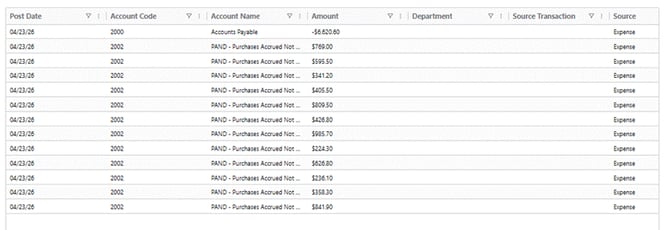
Bill Payment -- Haviland Invoice. Accounts Payable is credited while the Payment Account is debited. The PAND account is also credited but doesn’t display in the financial postings.

Expense – Credit Card AMEX. The Payment Account is debited while the AMEX account is credited.

Since this is an Expense, there is no Bill Payment to post because an Expense is a record of something already paid. The Check Type posts to the GL similarly to an Expense since it, too, represents a liability already paid.
Vendor Credit – A credit from your Vendor to be applied to a future purchase (Bill Type). Accounts Payable will be debited and the PAND account will be credited.

Once the credit is applied to a Bill, Accounts Payable will be credited and PAND will be debited.
Where do you create and map GL Accounts?
- Chart of Accounts: This is where you create the General Ledger accounts.
- Control Accounts: This is where you will define which GL Account to use for different transaction types. For example, which Asset Account should be used for Accounts Receivable and which Income Account should be used for Sales & Payment Discounts, and so on.
- Map Inventory to Financials: This is where you will define which GL Accounts should be used to post Revenue and Expense (COGS) transactions for SKUs by SKU Category.
- POS Station Management: There are 3 GL Accounts that must be mapped for Cash and Card transactions through POS Stations as well as Cash Overs and Unders.
- Other Payment Methods: LOU creates Cash, Check, Credit Card for you, but if you create other Payment Methods you must define what GL Account to which those payments will post.
- Tax Setup – Tax Authorities: When you create a Tax Authority, you must choose what Liability GL Account is used for that Authority.
- LOU Accounting – Payment Accounts: These Payment Accounts are used to track your various Payment Methods used to pay AP (Expenses) when using LOU Accounting.
- These are only set up if you are using LOU Accounting.
- Bank Payment Account Types will also be used for Bank Deposits.
Move Amounts from Clearing and Holding Accounts
- Merchant Clearing – cleared by creating a Merchant Deposit in Bank Deposits.
- Credits Merchant Clearing and debits your Bank Liability Account.
- Cash on Hand – cleared by creating a Cash and Check Deposit in Bank Deposits.
- Credits Cash on Hand and debits your Bank Liability Account.
- PAND – In LOU Accounting, this is cleared by creating an Expense Type Expense, applying Inventory to the Expense, and then creating the Bill Payment through Pay Bills.
- Credits Payment Account and debits PAND
- Outside LOU Accounting, you must follow your accounting software’s AP process for the Vendor Invoice, being sure to debit PAND in the process.
IMPORTANT! Refund Payments will post to the GL according to the Payment Method chosen. They must be included in the appropriate Bank Deposit to record the amount effectively reducing the bank balance.