
Once you’ve gotten started with Factor4, there are some setup items to take care of in LOU.
If you are looking for help processing a transaction with a gift card, head here.
If you are looking for help selling a gift card, head here.
Setup
You will need to make sure these items are created so that you can buy, sell, and track payments from gift cards.
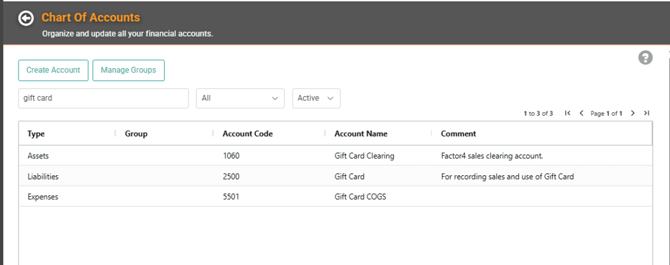
- General Ledger Accounts: you’ll need to set up a few GL Accounts for this.
- Gift card Payment Method and Deferred Revenue: a Liability account that can be mapped to the gift card Payment Method. This account will also be mapped to the Revenue field for the SKU Category for the gift card as deferred revenue instead of an Income or Expense account.
- Factor4 Payment Method: a clearing account that can be mapped to the Factor4 payment method to record sales of gift cards.
- Factor4 COGS Account: a COGS account to map to the SKU Category for the sale of a gift card.
- Vendors: create Factor4 as a Vendor
- Other Payment Methods: you’ll need two Payment Methods.
- Gift Card Payment Method: create a Payment Method called gift card that maps to the Liability account created for recording gift card payments.
- Make sure to exclude this Payment Method from Bank Deposits since the use of the gift card doesn’t impact your bank.
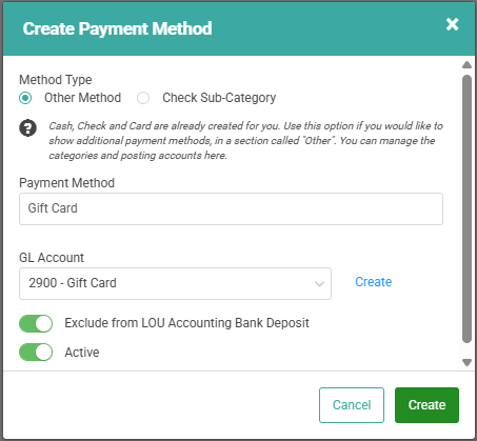
- Make sure to exclude this Payment Method from Bank Deposits since the use of the gift card doesn’t impact your bank.
- Factor4 Payment Method: Since Customers are buying the gift cards through the Factor4 app or terminal, and the payment is being automatically deposited into your bank account, you need to create this Payment Method to record sales of gift cards.
- Make sure to include this Payment Method in Bank Deposits since it will be deposited from Factor4 into your bank account.
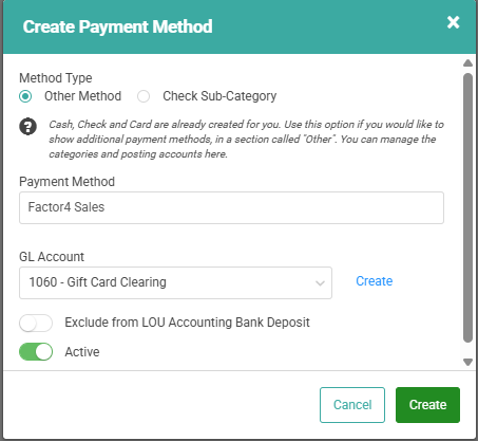
- Make sure to include this Payment Method in Bank Deposits since it will be deposited from Factor4 into your bank account.
- Gift Card Payment Method: create a Payment Method called gift card that maps to the Liability account created for recording gift card payments.
- SKUs: you need to create a SKU to track buying/selling the gift cards and you need a SKU Category.
- Unit Measures: You should create the Units of Measure coinciding with the card packages sold on Factor4. Ex: Box100, Box125, Box250, Box500, Box1000, and Box1500 to start.
- SKU Category: the SKU needs to be in its own SKU Category so that you can map the Revenue to a Liability Account instead of a Revenue Account and the right COGS.

- Inventory SKU: if you want to track quantity of gift cards available to sell, you can create an Inventory SKU for each denomination you will sell.
- This SKU should have a $0 Sell Price
- Choose the quantity you most often will purchase from the Vendor as the Vendor UOM and enter that Cost.
- Sell By Each with a Fixed Price of $0 (you will update the price with the correct denomination when selling the gift card)
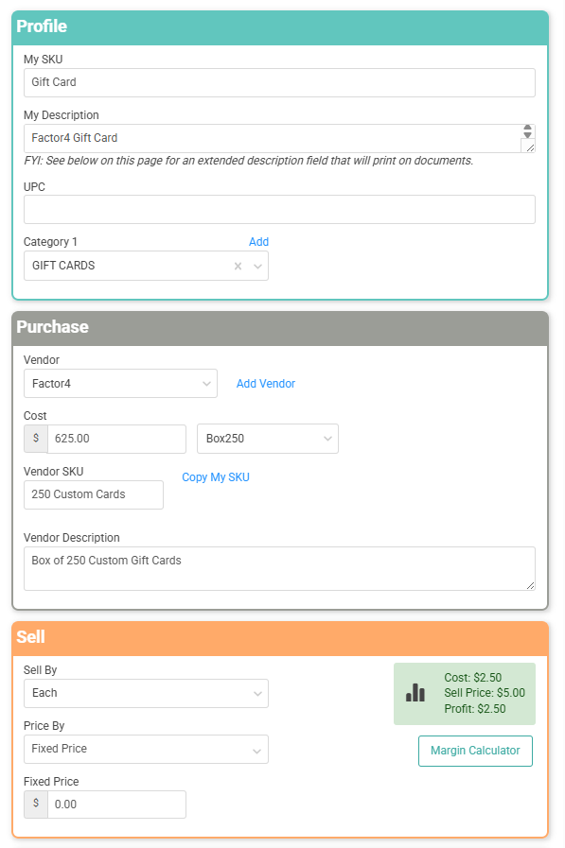
- On the SKU Profile, click Edit SKU and toggle Taxable OFF to ensure you do not collect tax on the gift card.