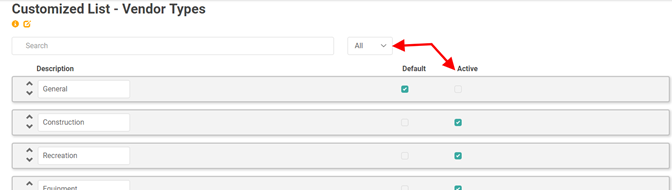
Vendor Types allow you to create the different kinds of vendors with which you do business.
LOU automatically creates a default Vendor Type when you create your company in LOU. You can rename this General Vendor Type and create additional Vendor Types.
Go to Product Setup / Accounting / Vendor Types
- To create a new Vendor Type, click

- Enter a name in the Description box

Repeat these steps for each Vendor Type you want to create.
TIP! If you use 1099s with your Vendors, create a Vendor Type called 1099 Vendor or something similar to easily identify those Vendors on reports for Month and Year End activities and audits.
Delete Vendor Types
You cannot delete a Vendor Type. However, you can uncheck the box under the Active column.
To see your Inactive Vendor Types, change the Active Status dropdown to All.